Illustration. AI-generated preview, not medical advice. Real results vary.
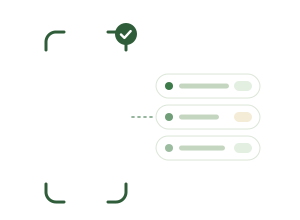
Smart product scan
Let AI read the ingredients, understand the benefits, and measure how relevant the product is for your skin.
Relevance score Verified
0.0/10
Acne85%
Dark spots78%
Oil control72%
Texture60%
AI-based relevance from the label, not medical advice.
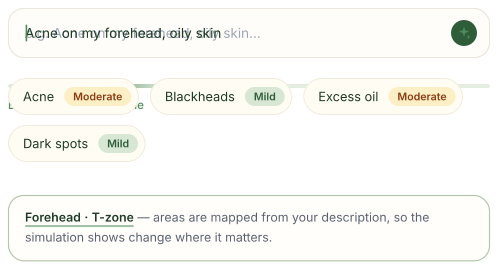
Your skin profile
Describe your skin in your own words, typed or spoken, or select from concern chips. AI turns it into a detailed skin profile.
A cosmetic profile, not a medical diagnosis.
Neem Plus
Neem AI, your skincare assistant
Ask about your skin, a product you scanned, today’s routine or a past simulation. Neem already knows them, answers in a few words, and can start a simulation or update a routine once you confirm.
Answers from your own skin profile and products
Acts only when you tap Confirm
Save the conversations you want to keep
General skincare information, not medical advice.
Can I simulate the serum I scanned?
Yes. It targets your dark spots. Want me to start a 90-day simulation?
Start a simulation
On your current skin profile. Ready in about a minute.
Confirm
Your simulations, always at hand
Every simulation stays in your History. Slide between Day 0 and Day 90, follow the timeline with its detailed insights, and download your Skincare Report to keep.
Before and after, side by side
A Skincare Report for each simulation
On your Home Screen with the Neem widget
AI-generated previews, not medical advice. Real results vary.
My Schedule
From scanto daily routine.
Liked what you saw? Neem turns the product into a simple routine, reminds you when it’s time, and keeps track of every step.
Built from the label
Neem AI reads the product’s directions and suggests when and how often to use it.
Your times, your days
Morning, evening or both, every day or the days you choose. Pause anytime.
Gentle reminders
A notification at the time you pick. Snooze it for 15 minutes or an hour.
Check it off
Tick each step and watch your day and week fill in.
Routines are guidance, not medical advice. Always check the product label.
Thursday
Today’s tasks
Next up: Gentle Cleanser · Morning
0/4
M
T
W
T
F
S
S
Morning
Evening
Widgets
Neem, right onyour Home Screen.
Tick off today’s routine, scan a product or ask Neem without opening the app. Your latest simulation and report stay one tap away.
Prices are shown in the app in your local currency. Neem Plus is billed through the App Store or Google Play and renews automatically until cancelled. Cancel anytime in your store account settings.
Questions, answered
Everything you need to know before your first simulation.
Do I need to upload a selfie?
No. Neem never asks for a photo of you. You choose one of 18 realistic AI face models, from fair to deep skin, describe your skin, and the simulation is shown on that model.
Is Neem a medical device?
No. Neem shows AI-generated cosmetic previews for information only. It doesn’t diagnose, treat or give medical advice, and real results vary. For any skin condition, talk to a dermatologist.
How does Neem decide how my skin could change?
Neem reads the product’s label — its ingredients, claims and category — and compares it with your skin profile. The simulation stays conservative when the evidence is weak, and only shows change for the concerns the product targets.
Can I use it in my language?
Yes. The app is available in English, French and Arabic, and the AI writes your profile, product analysis and summaries in the language you pick.
What happens after my free simulation?
Your free simulation stays saved, with Day 0 and Day 90. Neem Plus unlocks Day 30 and 60, detailed insights for each concern, up to 5 simulations a day, the Neem AI assistant, your Skincare Report and side-by-side comparisons of your simulations.
What is the Skincare Report?
A PDF of your skin profile, scanned products, routine, journey and simulations, for all your history or the last 7, 30 or 90 days, or for a single simulation from History, in your language. It’s part of Neem Plus. Neem makes it on your phone and doesn’t keep a copy: save it or share it from your share sheet. It’s for your personal records, not a medical document.
What is the Neem AI assistant?
A skincare assistant included with Neem Plus. Ask about your skin, a product you scanned, your routine or a past simulation, typing or speaking in English, French or Arabic, and it answers from your own Neem data. It can also prepare your Skincare Report as a PDF. It can start a simulation or update a routine, but only after you tap Confirm. It gives general information, not medical advice.
How do I cancel my subscription?
Neem Plus is managed by the App Store or Google Play. Cancel in your store account settings at least 24 hours before the renewal date. Deleting your Neem account does not cancel the subscription.
How is my data handled?
Your product photos and generated images are stored privately, and you can delete your account and data from the app at any time. Read the Privacy Policy.